Please fill out the form below, and we will get back to you as soon as possible.
29
May
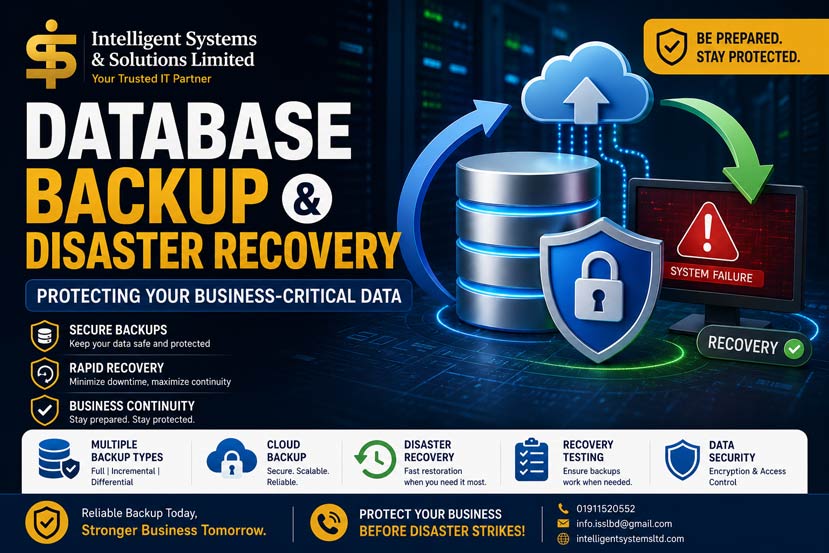
Database Backup and Disaster Recovery Solutions for Businesses
Learn why database backup and disaster recovery are essential for business continuity. Discover backup strategies, disaster recovery planning, cloud backup solutions, and best practices to protect critical business data.
database backup solutions, database disaster recovery, database recovery services, backup and recovery management, database security, disaster recovery planning, cloud backup solutions, database protection services
Imagine arriving at work on a Monday morning only to discover that your ERP system is inaccessible, customer records have disappeared, financial transactions are missing, and years of business data can no longer be recovered.
For many organizations, this is not a hypothetical scenario.
Every year, businesses around the world lose valuable data due to hardware failures, ransomware attacks, accidental deletions, software corruption, and human errors. In many cases, companies without proper backup and disaster recovery systems face operational disruptions, financial losses, reputational damage, and even permanent business closure.
Data has become one of the most valuable assets of modern organizations. Protecting that data is no longer optional—it is a business necessity.
This is where database backup and disaster recovery solutions play a critical role.
Every business depends on information.
Customer records, financial transactions, inventory data, employee information, ERP records, project files, and operational reports are all stored within databases.
When these databases become unavailable or corrupted, business operations can come to a complete standstill.
Database backups provide a safety net that allows organizations to recover data quickly when unexpected incidents occur.
A reliable backup strategy helps businesses:
Protect critical business information
Minimize downtime
Recover from cyberattacks
Prevent permanent data loss
Ensure regulatory compliance
Maintain customer trust
Support business continuity
Simply put, backups are the last line of defense between a business and a potentially devastating data disaster.
Many organizations underestimate the financial impact of losing data.
Data loss affects far more than IT systems.
It impacts:
Employees cannot access systems needed to perform their jobs.
Sales processes, customer transactions, and business operations may stop entirely.
Customers lose confidence when services become unavailable.
Organizations may face regulatory penalties for failing to protect sensitive information.
Emergency recovery efforts are often expensive and time-consuming.
For many businesses, even a few hours of downtime can result in significant losses.
Organizations without reliable backup and recovery solutions face substantial risks.
| Risk | Potential Impact |
|---|---|
| Data Loss | Loss of critical business records |
| Downtime | Operational disruption |
| Financial Loss | Revenue and productivity losses |
| Security Incidents | Increased vulnerability to cyberattacks |
| Compliance Violations | Regulatory penalties |
| Customer Dissatisfaction | Loss of trust and reputation |
Many businesses only recognize these risks after experiencing a disaster.
By then, recovery may be difficult or impossible.
Not all backups are created equal.
A comprehensive backup strategy often combines multiple backup methods.
A full backup creates a complete copy of the database.
Simplified recovery process
Comprehensive data protection
Easy management
Requires more storage space
Takes longer to complete
Full backups serve as the foundation of most backup strategies.
Incremental backups only store changes made since the last backup.
Faster backup process
Reduced storage requirements
Efficient resource usage
Recovery can be more complex
Requires multiple backup files
Incremental backups are ideal for organizations with large databases and frequent updates.
Differential backups store all changes made since the last full backup.
Faster recovery than incremental backups
Reduced storage compared to full backups
Larger than incremental backups
Storage requirements increase over time
Many businesses combine full and differential backups for balanced protection and recovery speed.
Understanding the causes of data loss helps organizations prepare more effectively.
Servers, storage devices, and network equipment eventually fail.
Without backups, hardware failures can result in permanent data loss.
Employees may accidentally:
Delete records
Modify critical data
Misconfigure systems
Overwrite files
Human error remains one of the leading causes of data loss worldwide.
Modern cyber threats include:
Ransomware
Malware
Unauthorized access
Data theft
Attackers increasingly target business databases because of their value.
Application failures, database corruption, and operating system issues can damage data integrity.
Floods, fires, earthquakes, and power failures can disrupt entire IT infrastructures.
Organizations must plan for scenarios that are beyond their control.
A backup alone is not enough.
Organizations also need a clear disaster recovery strategy.
Disaster recovery planning focuses on restoring systems and operations after a disruption.
The objective is to minimize:
Downtime
Data loss
Business disruption
Financial impact
Identify potential threats and vulnerabilities.
Define:
How quickly systems must be restored.
How much data loss is acceptable.
Document detailed recovery steps and responsibilities.
Ensure backup systems are available and reliable.
Validate recovery capabilities through routine testing.
A disaster recovery plan is only effective if it works when needed.
Manual backups often fail due to human oversight.
Automation improves reliability and consistency.
Ensure backups occur consistently.
Verify completion status regularly.
Reduce dependency on a single storage environment.
Maintain historical versions of critical data.
Protect sensitive information from unauthorized access.
Automation reduces risk while improving operational efficiency.
Cloud technology has transformed how businesses protect data.
Cloud backup solutions offer:
Scalability
Flexibility
Cost efficiency
Geographic redundancy
Remote accessibility
Organizations increasingly use cloud backup systems as part of their disaster recovery strategy.
| Benefit | Advantage |
|---|---|
| Offsite Protection | Reduced physical risks |
| Scalability | Easy expansion |
| Accessibility | Remote recovery capabilities |
| Security | Advanced encryption |
| Cost Efficiency | Reduced infrastructure investment |
Cloud backup has become an essential component of modern business continuity planning.
Many businesses create backups but never verify whether recovery actually works.
This is a major mistake.
Recovery testing ensures:
Backup files are usable
Recovery procedures are effective
Teams understand responsibilities
Downtime is minimized
Regular testing identifies weaknesses before a real disaster occurs.
A backup that cannot be restored successfully provides little value.
Today's businesses face increasingly complex environments.
Challenges include:
Large data volumes
Hybrid cloud infrastructure
Remote work environments
Cybersecurity threats
Compliance requirements
Organizations need modern backup strategies that evolve alongside business growth.
At Intelligent Systems and Solutions Limited (ISSL), we understand that business continuity depends on reliable data protection.
Our database backup and disaster recovery services are designed to help organizations safeguard mission-critical information while minimizing operational risks.
Automated and secure backup solutions.
Comprehensive recovery strategies for business continuity.
Scalable cloud-based data protection services.
Validation of backup and recovery procedures.
Protection against ransomware, cyber threats, and unauthorized access.
Proactive monitoring and risk management.
Our database experts have experience supporting organizations in both local and international markets, helping businesses maintain secure, reliable, and resilient database environments.
Data loss is no longer a question of if—it is a question of when.
Hardware failures, cyberattacks, human errors, and unexpected disasters can affect any organization.
The difference between a temporary disruption and a business crisis often comes down to preparation.
A well-designed database backup and disaster recovery strategy helps organizations:
Protect valuable information
Minimize downtime
Reduce financial losses
Maintain customer trust
Ensure business continuity
Businesses that invest in backup and recovery solutions today are better prepared for the challenges of tomorrow.
Because when disaster strikes, recovery should be a process—not a panic.
Professional Database Backup Solutions, Disaster Recovery Planning, Cloud Backup Services, Database Security, and Enterprise Data Protection.
📞 Phone: 01911520552
📩 Email: info.isslbd@gmail.com
🌐 Website: intelligentsystemsltd.com
Local Expertise. International Experience. Enterprise Data Protection.